- Home Page /
- Books /
- Computers & Technology /
- Operating Systems /
- Windows /
- Windows Desktop /
- Windows 11 Introduction Quick Reference Guide...


Item #:
59821889
Windows 11 Introduction Quick Reference Guide (Cheat Sheet of Instructions, Tips & Shortcuts - Laminated)
85% of respondents would recommend this to a friend
Item #:
59821889
CAD 22
Price Details
Excluding Shipping & Custom charges ( Shipping and custom charges will be calculated on checkout )
*All items will import from US
Afterpay Information

Split your bill into 4 payments of CAD 5.5 interest-free
 Add the item to your cart
 Select Afterpay at checkout
 Fill in your details
 Complete your first payment
and pay the remaining in easy instalments or according to the payment plan you selected
Here’s why you should Afterpay it

Get everything you need now..
Shop thousands of brands and millions of products, online and in-store.

Pay over six weeks.
Make the first payment upfront and the rest over time. Always interest-free when you pay it in 4.

No fees when you pay on time.
We’ll send you reminders and cap late payments to help you get back on track.
(1) Terms and conditions. apply. (2) Installment Agreement. (3) Eligible for customers in. Canada, (4) Your final payment plan may vary depending on your credit history.
0 ratings
Write a review
In stock
 Imported from USA store
QTY:
Order now and get it around Saturday, October 17
Secured transaction
Ubuy works hard to protect your security and privacy. Our advanced payment security system ensures confidentiality by encrypting your information during transmission using AES (Advanced Encryption Standards) and SSL (Secure Socket Layer) protocols. Your payment details are 100% secure as we do not share your payment details with third party sellers.
Our Top Logistics Partners


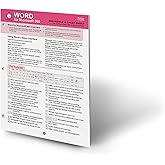
Four page laminated quick reference guide showing step-by-step instructions and shortcuts for how to use Microsoft Windows 11.

Buy Now Pay Later

Fast
Shipping

Free
Return*

Secure Packaging

100% Original Products

PCI DSS Compliance

ISO 27001 Certified




What Stands Out
Laminated Design
Durable and water-resistant, this laminated guide withstands everyday use, ensuring long-lasting reference material for Windows 11 users.
Concise Instructions
Packed with easy-to-follow tips and shortcuts, the cheat sheet boosts user efficiency, helping them navigate Windows 11 with confidence and ease.
Quick Access
Specifically designed for quick reference, this guide allows users to swiftly find essential information, saving time and enhancing productivity when using Windows 11.
Product Details
- This 4-page laminated quick reference guide is your go-to companion for navigating Microsoft Windows 11 with step-by-step instructions and handy shortcuts. Whether you're a new user or just need a quick refresher, this guide is perfect for you! Designed for all skill levels, it's ideal for training handouts or as a convenient everyday reference. Includes touch interface tips for tablet and touchscreen users. Here's a peek at what’s covered:🌟 Getting Started:Start and end your Windows session with ease.🚀 Accessing Apps & Content:Set up and personalize the Start Menu.Pin, rearrange, and manage your apps like a pro!🔔 Taskbar & Notifications:Customize your Taskbar, access notifications, and manage Quick Settings in a snap.📂 Managing Files with File Explorer:Organize your files and folders, create new ones, and master file searches.Learn to zip/unzip files, move content, and work with libraries!🛠️ Settings & Troubleshooting:Personalize your lock screen, set up WiFi, and troubleshoot frozen apps with confidence.👥 Users & Security:Add user sign-ins, switch between accounts, and configure sign-in options for enhanced security.Also included:🔟 Top 10 Things You Need to Know🎹 A list of essential keyboard shortcuts🖱️ Mouse/Touch Equivalents for easy navigation on any device.
| Publisher | Beezix Inc |
| Publication date | March 10, 2022 |
| Language | English |
| Print length | 4 pages |
| ISBN-10 | 1939791200 |
| ISBN-13 | 978-1939791207 |
| Item Weight | 3.2 ounces (90.72 grams) |
| Dimensions | 11 x 8.5 x 0 inches (27.9 x 21.6 x 0 cm) |
Who Should Buy?

-
New Users
Ideal for individuals who are transitioning to Windows 11 for the first time and need guidance.
-
Educators
Useful for teachers who want to integrate Windows 11 tips into their tech curriculum efficiently.
-
Professionals
Great for busy professionals seeking quick access to shortcuts and tips to enhance productivity with Windows 11.

-
Advanced Users
Not suitable for tech-savvy individuals who already possess extensive knowledge of Windows operating systems.
Product Description
Have any Query? Chat with us
Product Buying Guide
The Windows 11 Introduction Quick Reference Guide is a four-page laminated pamphlet designed to help users navigate and utilize Microsoft Windows 11 with ease. It covers a wide range of topics from starting and ending a Windows session to managing content with File Explorer, along with settings, troubleshooting, users, and security functions. This guide is suitable for users of all levels, making it a valuable tool for individuals seeking to enhance their Windows 11 experience.
Product Specifications
- Laminated
- 4
- Microsoft Windows 11
- March 9, 2022
Key Features
- Comprehensive coverage of basic to advanced Windows 11 functions
- User-friendly layout with step-by-step instructions and shortcuts
- Includes touch interface capabilities for touchscreen devices
- Top 10 Things You Need to Know list, Keyboard Shortcuts, and Mouse/Touch Equivalents included for quick reference
Usage Scenarios
- Ideal as a training handout for educational purposes
- Useful for quick reference during work or personal computing tasks
- Suitable for individuals transitioning to Windows 11 or seeking to enhance their proficiency
Usage Scenarios
The product is unique and does not have direct competitors in the same format. However, other similar resources include online tutorials, user guides, and digital manuals available from Microsoft and other publishers.
Some User Review
- The guide has been incredibly helpful in increasing my productivity with Windows 11.
- It's a handy reference tool that saves time and effort while performing various tasks on Windows 11.
- Even as an experienced user, I found the guide to be beneficial for quickly accessing essential shortcuts and functions.
Competitors
- Comparable to other laminated quick reference guides
- Considering the comprehensive coverage and ease of use, the guide offers great value for its price.
Buying Considerations
- Suitable for users of all levels, from beginners to advanced
- Ideal for individuals who prefer tangible quick reference guides over digital resources
- Can significantly enhance productivity and efficiency in navigating Windows 11
Conclusion
The Windows 11 Introduction Quick Reference Guide serves as an essential tool for users seeking to optimize their experience with Windows 11. Its comprehensive coverage, user-friendly layout, and tangible format make it a valuable resource for individuals of all proficiency levels.
View LessThe Windows 11 Introduction Quick Reference Guide is a four-page laminated pamphlet designed to help users navigate and utilize Microsoft Windows 11 with ease. It covers a wide range of topics from starting and ending a Windows session to managing content with File Explorer, along with settings, troubleshooting, users, and security functions. This guide is suitable for users of all levels, making it a valuable tool for individuals seeking to enhance their Windows 11 experience. Continue Reading
Customer Questions & Answers
-
Question:
How to Shop Windows 11 Introduction Quick Reference Guide (Cheat Online From Ubuy?
Answer: It’s easy to shop Windows 11 Introduction Quick Reference Guide (Cheat online from Ubuy. You just have to search for the product, choose your shipping method while checking out and get it delivered to your location. -
Question:
Is Windows 11 Introduction Quick Reference Guide (Cheat Available to Shop Online in Canada?
Answer: Yes, at Ubuy Canada this product is available for you to shop at a reasonable price. The Windows 11 Introduction Quick Reference Guide (Cheat is not available locally but you can trust us with our express shipping services. -
Question:
How Long Does It Take to Get Product After Placing the Order?
Answer: The delivery time of your ordered product varies as per what you've ordered and the shipping method that you've chosen. The estimated delivery time is mentioned during the checkout process, so be carefree while shopping.
Windows Desktop Editorial Review
The Windows 11 Introduction Quick Reference Guide Cheat Sheet is a handy laminated pamphlet designed to help users navigate the newest version of Windows. The guide includes a variety of instructions, tips, and shortcuts that are helpful for both new and experienced users. The guide is clearly written and easy to understand, making it a useful resource for anyone looking to improve their Windows 11 skills. Overall, this guide seems to be received positively by users. With an average rating of 4 out of 5 stars, many customers find the guide to be a useful tool for navigating Windows 11. Some customers find it especially helpful for new laptop owners who may not be familiar with the latest Windows operating system.
Customer Reviews & Ratings
408 customers ratings
-
5 Star
64%
-
4 Star
18%
-
3 Star
11%
-
2 Star
4%
-
1 Star
3%
Review this product
Share your thoughts with other customers
Pros
- Contains a variety of instructions, tips and shortcuts
- Easy to understand and use
- Great for new laptop owners
- Laminated for durability
Cons
- Not useful for those who are already familiar with Windows 11
Customers also viewed these products
Product Price History
Important information
- Limitations : For products shipped internationally, please note that any manufacturer warranty may not be valid; manufacturer service options may not be available; product manuals, instructions, and safety warnings may not be in destination country languages; the products (and accompanying materials) may not be designed in accordance with destination country standards, specifications, and labeling requirements; and the products may not conform to destination country voltage and other electrical standards (requiring use of an adapter or converter if appropriate). The recipient is responsible for assuring that the product can be lawfully imported to the destination country. When ordering from Ubuy or its affiliates, the recipient is the importer of record and must comply with all laws and regulations of the destination country.
- Not all the products listed on Ubuy are for sale, as Ubuy is a global search engine. Products are subject to export/trade regulations.
CAD 22
Order now and get it around Saturday, October 17
This item is not restrict in my country.(Please click on above link if this item is not restrict in your country, So our team will review and allow.)
QTY:
Secured transaction
PCI DSS compliant and ISO 27001:2022 certified, with encrypted payments and full buyer protection on every order.
Our Top Logistics Partners
Fastest cross-border delivery
Features & Benefits
- Comprehensive guide for using Windows 11
- Includes instructions, shortcuts, and tips
- Suitable for all types of users
- Covers topics like starting Windows, accessing apps, working with files, and more
- Includes a Top 10 Things You Need to Know list
- Contains a list of keyboard shortcuts and mouse/touch equivalents
Ubuy Assurance
Experience worry-free shopping with 100% original products, PCI DSS-compliant payment security, ISO 27001-certified data protection, the fastest cross-border delivery, free returns *, and secure packaging on every order.