- Home Page /
- Video Games /
- PC /
- Accessories /
- Goekhyrani Flight Simulator Control Panel, A103 A32X/A3...
0 ratings





Item #:
149252391
Goekhyrani Flight Simulator Control Panel, A103 A32X/A31X/A350/XECAM HOME COCKPIT Landing Gear Indicator Integrated Panel for MSFS 2020/2024 -
Item #:
149252391
CAD 410
Price Details
Excluding Shipping & Custom charges ( Shipping and custom charges will be calculated on checkout )
*All items will import from US
Afterpay Information

Split your bill into 4 payments of CAD 102.5 interest-free
 Add the item to your cart
 Select Afterpay at checkout
 Fill in your details
 Complete your first payment
and pay the remaining in easy instalments or according to the payment plan you selected
Here’s why you should Afterpay it

Get everything you need now..
Shop thousands of brands and millions of products, online and in-store.

Pay over six weeks.
Make the first payment upfront and the rest over time. Always interest-free when you pay it in 4.

No fees when you pay on time.
We’ll send you reminders and cap late payments to help you get back on track.
(1) Terms and conditions. apply. (2) Installment Agreement. (3) Eligible for customers in. Canada, (4) Your final payment plan may vary depending on your credit history.
0 ratings
Write a review
In stock
 Imported from USA store
QTY:
Order now and get it around Thursday, July 16
Secured transaction
Ubuy works hard to protect your security and privacy. Our advanced payment security system ensures confidentiality by encrypting your information during transmission using AES (Advanced Encryption Standards) and SSL (Secure Socket Layer) protocols. Your payment details are 100% secure as we do not share your payment details with third party sellers.
Our Top Logistics Partners


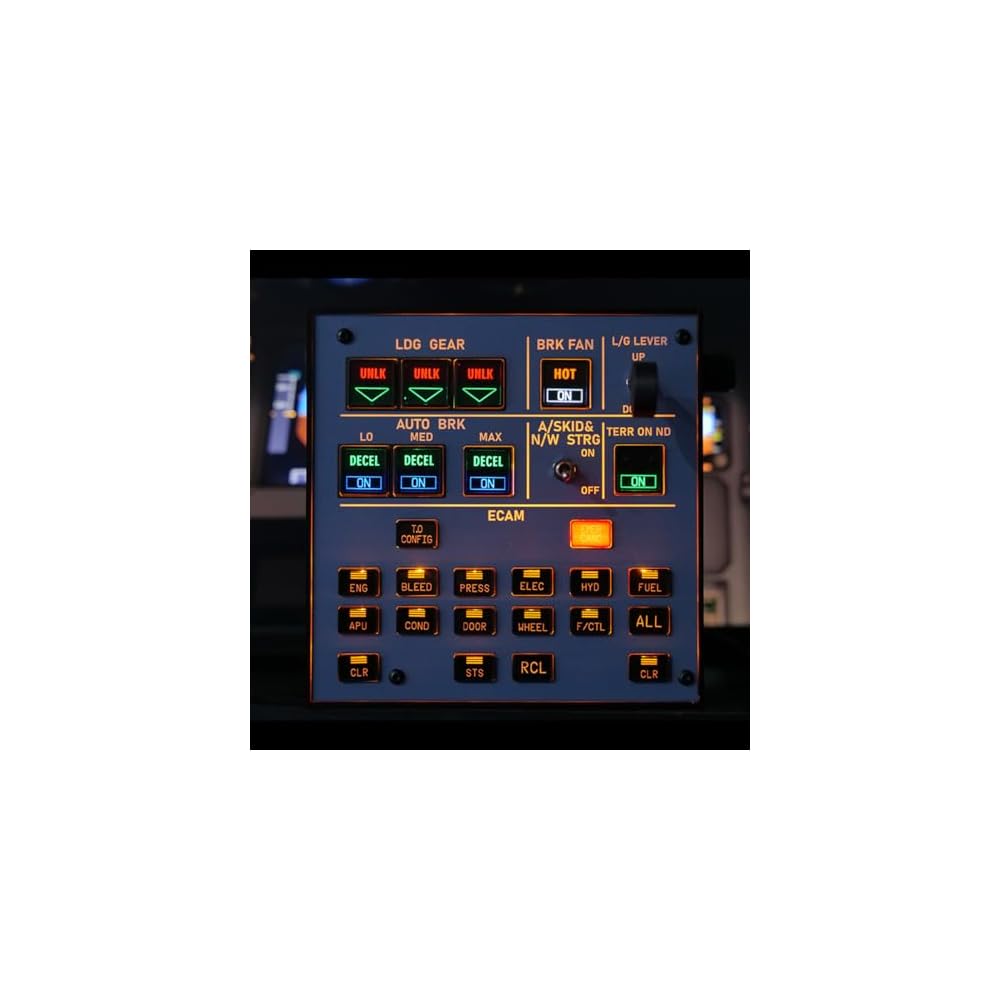
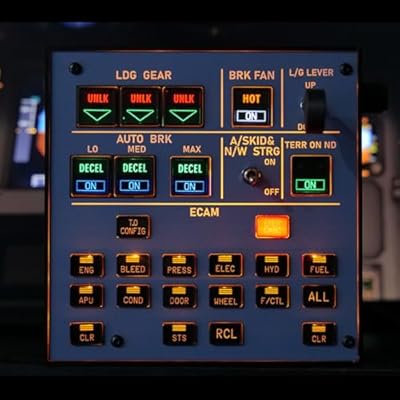
Combines ECAM and landing functions into a single compact panel, helping you optimize your setup without cluttering your desktop.

Buy Now Pay Later

Fast
Shipping

Free
Return*

Secure Packaging

100% Original Products

PCI DSS Compliance

ISO 27001 Certified


What Stands Out
Integrated Landing Gear
Offers a dedicated landing gear indicator, enhancing realism during flight simulations, ensuring users maintain focus on essential cockpit operations in MSFS 2020/2024 for a better immersive experience.
Multi-Compatible Design
Designed to work seamlessly with Fenix, FBW ini, and A32X/A31X/A350 setups, making it a versatile choice for various aircraft enthusiasts looking for comprehensive home cockpit solutions.
User-Friendly Setup
Easily integrates into existing home cockpit systems, providing straightforward installation and minimal configuration, allowing users to focus on flying without dealing with complicated setup procedures.
Product Details
- One Panel for ECAM and Landing Controls–Saves Valuable Desk Space: Combines ECAM and landing functions into a single compact panel, helping you optimize your setup without cluttering your desktop
- Note on 3D Printed Parts: Please be aware that 3D-printed enclosures may have minor imperfections. Additionally, the 3D-printed knobs may rotate freely and cannot be fixed in position
- Wide Compatibility with A32X Models: Thanks to Mobiflights broad compatibility, this lighting panel supports nearly all major A32X models available on the market, including Fenix, FBW, iniBuilds, and others
- Stable Performance with Mobiflight Support: Powered by Mobiflight firmware with full usage tutorial provided. Built using PCB board manufacturing for enhanced stability. Comes with a custom high-definition panel sticker, a convenient 13-degree tilt angle for better operation, and a non-slip bottom that adheres to your desktop. Includes a USB data cable. The realistic push-button switches add greater immersion to your flight simulation experience
- Compatible with Multiple Aircraft Types: In addition to the A32X, this panel is also suitable for other aircraft models such as the A38x, B773 and B777. (Please confirm your specific aircraft model before placing an order
| Product Dimensions (L x W x H) | 5.83 x 5.83 x 1.34 inches (14.8 x 14.8 x 3.4 cm); 15.87 ounces (449.91 grams) |
| Type of item | Video Game |
| Item model number | 3114YG2E51RQU149LW1IL4 |
| Item Weight | 15.9 ounces (450.77 grams) |
| Manufacturer | Goekhyrani |
| Date First Available | July 8, 2025 |
Who Should Buy?

-
Avid Flight Simulators
Perfect for enthusiasts seeking realistic flight experiences with enhanced control and immersion.
-
Home Cockpit Builders
Ideal for individuals constructing their flight simulator setups requiring sophisticated control panels and indicators.
-
Compatibility Seekers
Users of MSFS 2020/2024 looking for versatile equipment that integrates well with various aircraft add-ons.

-
Casual Gamers
Not suitable for those who prefer simple and casual flying experiences without complex controls.
-
Budget-Conscious Buyers
May not be ideal for users looking for inexpensive options in flight simulation tools and accessories.
-
Non-Simulator Users
Individuals not engaged in flight simulation will find this product unnecessary and lacking utility.
Product Description
Have any Query? Chat with us
Customer Questions & Answers
-
Question:
What simulation software is compatible with the Goekhyrani Flight Simulator Control Panel?
Answer: The Goekhyrani Flight Simulator Control Panel is designed to be fully compatible with Microsoft Flight Simulator 2020 and 2024. This allows users to have a more immersive experience while flying popular aircraft like the A320 family and A350. By integrating with these software setups, the control panel enhances realism through functioning landing gear indicators and controls, making your simulation experience more professional and engaging. -
Question:
How does the integrated landing gear indicator work?
Answer: The integrated landing gear indicator provides real-time status updates of the aircraft's landing gear, making it easier for pilots to manage landings. This panel utilizes LED indicators to show whether the landing gear is down, up, or in transit. Its clear visual feedback allows users to focus more on flying rather than checking multiple instruments, which is especially useful during complex landing scenarios. -
Question:
Is the Goekhyrani Flight Simulator Control Panel easy to install?
Answer: Yes, the Goekhyrani Flight Simulator Control Panel is designed for straightforward setup. Generally, it involves connecting the panel via USB to your PC, where it will be automatically recognized by the simulation software. This ease of installation means you can quickly set up your home cockpit without extensive technical knowledge, saving you time so you can focus on what matters most – flying. -
Question:
What features make this control panel ideal for home cockpits?
Answer: This control panel includes numerous features that enhance the home cockpit experience, such as adjustable lighting on the indicators, durable switches, and precise functionality that mimics real aircraft controls. These elements are essential for serious flight simulator enthusiasts looking to replicate authentic flying conditions right from their living rooms, making each flight more realistic and satisfying. -
Question:
Can I use the control panel with other flight simulation setups?
Answer: While the Goekhyrani Flight Simulator Control Panel is optimized for MSFS 2020 and 2024, it may also be compatible with other flight simulation software that supports generic USB input. However, full functionality may vary based on the software and aircraft being used. Many pilots find it beneficial in diverse simulation environments, enhancing their overall flying experience, regardless of the platform. -
Question:
What are the dimensions of the Goekhyrani Flight Simulator Control Panel?
Answer: The dimensions of the Goekhyrani Flight Simulator Control Panel are designed to fit comfortably in most home cockpit setups. While the exact measurements may vary, its compact design allows it to integrate seamlessly with various cockpit layouts without taking up excessive space. This makes it a suitable choice for enthusiasts with limited room who still want a fully functional simulator. -
Question:
Is the control panel customizable?
Answer: Yes, the Goekhyrani Flight Simulator Control Panel allows for some degree of customization. Users can modify the way controls are mapped in their flight simulation software, enabling personal preferences to dictate layout and function. This personalization enhances comfort and usability during flights, allowing every pilot to create a cockpit that feels truly their own. -
Question:
Are there any additional accessories I should consider for optimal use?
Answer: To further enhance your flight simulation experience with the Goekhyrani Flight Simulator Control Panel, consider adding throttle quadrants, yoke systems, or additional multi-function displays. These tools complement the panel by providing a full range of flight controls, allowing you to simulate a wide variety of aircraft. Moreover, these additional instruments help create a more authentic cockpit atmosphere, enhancing immersion. -
Question:
What installation support is available for beginners?
Answer: Beginners looking to use the Goekhyrani Flight Simulator Control Panel can find various online tutorials and community forums dedicated to flight simulation support. Many experienced users share their insights on installation and troubleshooting, which can significantly help those new to home cockpits. Engaging with the community can also provide tips that improve your overall simulation experience. -
Question:
Where can I buy the Goekhyrani Flight Simulator Control Panel?
Answer: You can conveniently purchase the Goekhyrani Flight Simulator Control Panel from Ubuy in Canada. They offer a wide selection of flight simulation products, making it a reliable platform for obtaining equipment that enhances your virtual flying experience.
Goekhyrani Accessories 3114YG2E51RQU149LW1IL4 Editorial Review
No editorial reviews found
Customer Reviews & Ratings
1 customers ratings
-
5 Star
100%
-
4 Star
0%
-
3 Star
0%
-
2 Star
0%
-
1 Star
0%
Review this product
Share your thoughts with other customers
Product Price History
Important information
- Limitations : For products shipped internationally, please note that any manufacturer warranty may not be valid; manufacturer service options may not be available; product manuals, instructions, and safety warnings may not be in destination country languages; the products (and accompanying materials) may not be designed in accordance with destination country standards, specifications, and labeling requirements; and the products may not conform to destination country voltage and other electrical standards (requiring use of an adapter or converter if appropriate). The recipient is responsible for assuring that the product can be lawfully imported to the destination country. When ordering from Ubuy or its affiliates, the recipient is the importer of record and must comply with all laws and regulations of the destination country.
- Not all the products listed on Ubuy are for sale, as Ubuy is a global search engine. Products are subject to export/trade regulations.
CAD 410
Order now and get it around Thursday, July 16
This item is not restrict in my country.(Please click on above link if this item is not restrict in your country, So our team will review and allow.)
QTY:
Secured transaction
Ubuy works hard to protect your security and privacy. Our advanced payment security system ensures confidentiality by encrypting your information during transmission using AES (Advanced Encryption Standards) and SSL (Secure Socket Layer) protocols. Your payment details are 100% secure as we do not share your payment details with third party sellers.
Our Top Logistics Partners
Fastest cross-border delivery
Features & Benefits
- Compact design saves valuable desk space by integrating multiple functions.
- Wide compatibility with nearly all major A32X models for versatile use.
- Enhanced stability with Mobiflight firmware and high-quality PCB manufacturing.
- Realistic push-button switches enhance immersion during flight simulation.
- Custom high-definition panel sticker and non-slip bottom for better operation.
- USB data cable included for easy connectivity.