0 ratings


Numéro d'article:
13973709
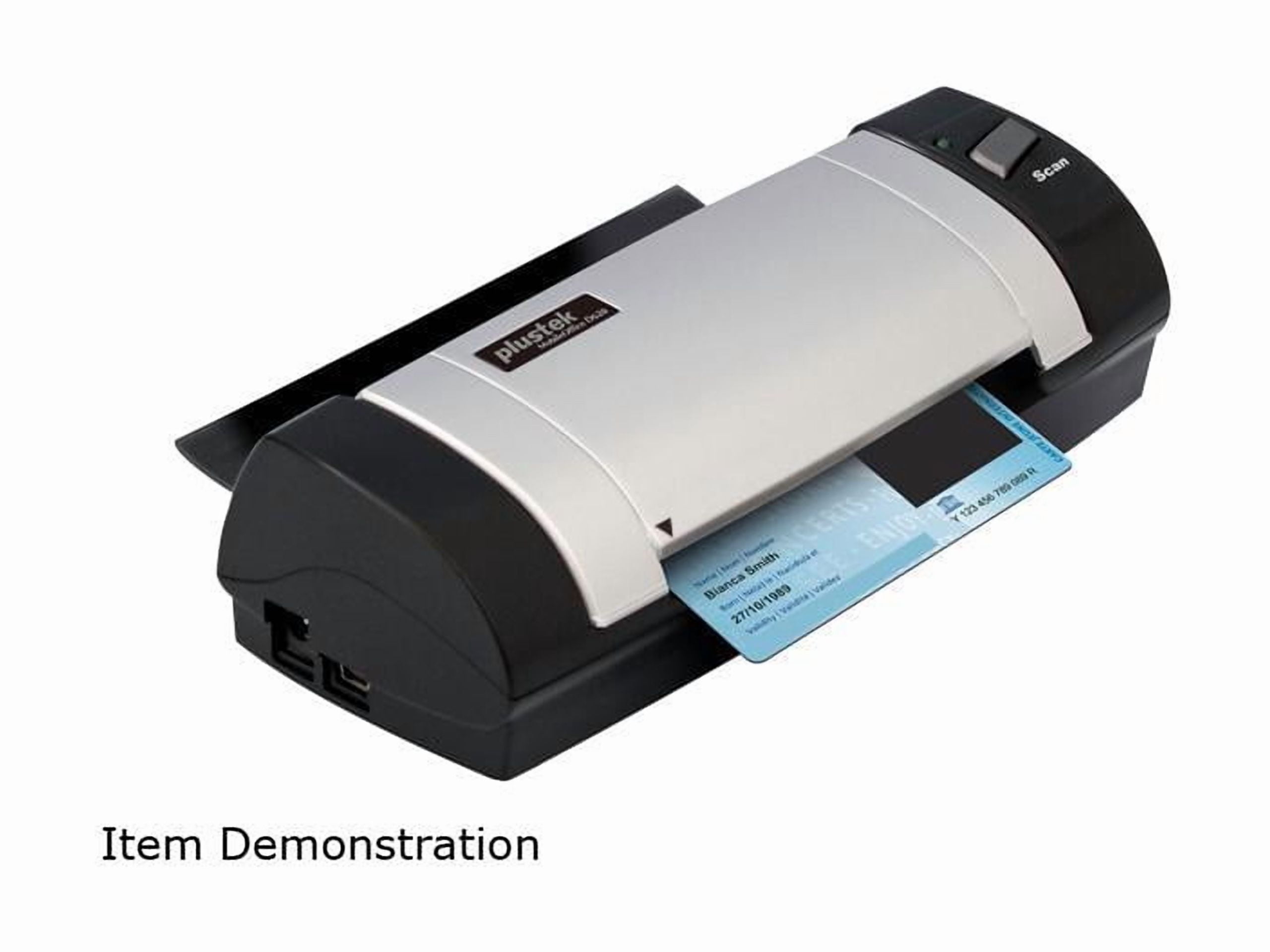
Plustek MobileOffice D620 600dpi Duplex Handheld Scanner - USB
97% des répondants recommanderaient ceci à un ami
Numéro d'article:
13973709
0 ratings
Écrire un commentaire
En rupture de stock
 Importé depuis la boutique USA
Transaction sécurisée
Ubuy s'engage à protéger votre sécurité et votre confidentialité. Notre système avancé de sécurité des paiements garantit la confidentialité en chiffrant vos informations lors de la transmission grâce aux protocoles AES (Advanced Encryption Standards) et SSL (Secure Socket Layer). Vos coordonnées de paiement sont 100 % sécurisées car nous ne partageons pas vos informations de paiement avec des vendeurs tiers.
Nos meilleurs partenaires logistiques


Experience the convenience and mobility of handheld scanning on the go with the Plustek MobileOffice D620.

Achetez maintenant, payez plus tard

Livraison
rapide

Retour
gratuit*

Emballage sécurisé

Produits 100 % originaux

Conformité PCI DSS

Certifié ISO 27001




Ce qui se démarque
Duplex Scanning
Effortlessly scan both sides of documents in one pass, reducing time and enhancing productivity for busy professionals needing efficiency without compromising quality.
Portable Design
Compact and lightweight, the MobileOffice D620 is ideal for on-the-go scanning, making it perfect for travelers and remote workers who require document management flexibility.
High Resolution
With a stunning 600dpi resolution, this scanner provides sharp and clear images, ensuring that every detail of your documents is captured with exceptional quality and precision.
Détails du produit
- Compact size and USB-powered for portability and versatility
- Scans both sides of cards, IDs, and documents in as little as 7 seconds
- Compatible with thousands of scanning and imaging programs through industry standard TWAIN and WIA drivers
- Includes ABBYY FineReader Sprint for easy creation of searchable PDFs
- Simple operation - load the card and press a button to automatically save scanned images and PDFs
- Warning: This product contains chemicals known to the State of California to cause cancer and reproductive harm (California Proposition 65)
À qui est-ce destiné ?

-
Frequent Travelers
Ideal for professionals who need to scan documents on-the-go without carrying bulky equipment.
-
Small Businesses
Perfect for businesses that require quick and efficient document scanning for record-keeping and organization.
-
Students and Researchers
Useful for scanning notes, articles, or books for study purposes without damaging original materials.

-
High Volume Scanning
Not suitable for users needing to scan large volumes of documents quickly due to its slower scanning speed.
DESCRIPTION DU PRODUIT
Plustek MobileOffice D620 600dpi Duplex Handheld Scanner - USB
Vous avez une question ? Chattez avec nous
Product Buying Guide
The Plustek D620 Card & ID Scanner is a compact and efficient scanner that is perfect for individuals and businesses looking to easily scan and manage cards, IDs, and documents. With its USB-powered design and compatibility with various scanning programs, it offers convenience and versatility. In this buying guide, we will explore the product specifications, key features, usage scenarios, competitors, user reviews, price analysis, and buying considerations to help you make an informed decision.
Product Specifications
- Brand: Plustek
- Model: D620
- Scanner Type: Card & ID Scanner
- Color: Black & Blue
- Duplex Scanning: Yes
- Maximum Resolution: 600 dpi
- Maximum Document Size: 4.13 x 23.36 inches
- Minimum Document Size: 1.57 x 1.77 inches
- Compatibility: TWAIN and WIA drivers
- Included Software: ABBYY FineReader Sprint
Key Features
- Compact and lightweight design
- USB-powered for convenient use
- Scans both sides of cards up to 1.2 mm thick
- Scans paper documents of various sizes
- Compatible with thousands of scanning and imaging programs
- Includes ABBYY FineReader Sprint for creating searchable PDFs
- Easy to use with automatic image and PDF saving
Usage Scenarios
- Crowded registration desks
- Office desks with limited space
- Mobile applications for on-the-go scanning
- Businesses that frequently handle ID cards
- Personal use to digitize and store important cards
- Creating searchable PDFs for efficient document management
Usage Scenarios
- Epson DS-310
- Fujitsu ScanSnap S1300i
- Canon imageFORMULA P-215II
Some User Review
- The Plustek D620 scanner has been a game-changer for my small business. It's compact and fits perfectly on my crowded desk. The scanning speed is impressive, and the image quality is excellent.
- I love how easy it is to use this scanner. Just load the card and press a button. The scanned images are saved automatically, which saves me a lot of time.
- The compatibility with different scanning programs is a huge plus. I use it with the software I'm comfortable with and it works like a charm.
- I've been using the Plustek D620 for a few months now, and I haven't faced any issues so far. It's reliable and efficient.
- The inclusion of ABBYY FineReader Sprint software is a great value addition. I can easily create searchable PDFs for better document organization.
Competitors
- The Plustek D620 Card & ID Scanner is competitively priced compared to its competitors. Considering its features and performance, it offers excellent value for money.
- While the exact price may vary depending on the retailer and any ongoing promotions, it is advisable to compare prices from multiple sellers to ensure you get the best deal.
Buying Considerations
- Consider the size and weight of the scanner to ensure it fits your intended workspace.
- Evaluate your scanning needs and ensure the D620 meets your requirements in terms of document size and thickness.
- Check the compatibility with your existing scanning software to avoid any compatibility issues.
- Read customer reviews and consider the overall user satisfaction with the product.
- Compare prices from different retailers to find the best deal and take advantage of any ongoing promotions.
Conclusion
The Plustek D620 Card & ID Scanner is a reliable and efficient scanner that offers convenience and versatility. Its compact design, USB-powered operation, and compatibility with various scanning programs make it an excellent choice for individuals and businesses alike. With positive user reviews and a competitive price point, the D620 is a great investment for anyone in need of a high-quality card and ID scanner.
Voir moinsThe Plustek D620 Card & ID Scanner is a compact and efficient scanner that is perfect for individuals and businesses looking to easily scan and manage cards, IDs, and documents. With its USB-powered design and compatibility with various scanning programs, it offers convenience and versatility. In this buying guide, we will explore the product specifications, key features, usage scenarios, competitors, user reviews, price analysis, and buying considerations to help you make an informed decision. Continue Reading
Questions et réponses des clients
-
question:
Comment acheter Plustek MobileOffice D620 600dpi Duplex Handheld en ligne sur Ubuy ?
répondre: Il est facile d'acheter Plustek MobileOffice D620 600dpi Duplex Handheld en ligne sur Ubuy.. Il vous suffit de rechercher le produit, de choisir votre mode d'expédition lors du paiement et de le faire livrer à votre emplacement. -
question:
Plustek MobileOffice D620 600dpi Duplex Handheld est-il disponible pour effectuer des achats en ligne à Canada ?
répondre: Oui, chez Ubuy Canada, ce produit est disponible pour vous à un prix raisonnable.. Le Plustek MobileOffice D620 600dpi Duplex Handheld n'est pas disponible localement mais vous pouvez nous faire confiance avec nos services d'expédition express. -
question:
Combien de temps faut-il pour obtenir le produit après avoir passé la commande ?
répondre: Le délai de livraison de votre produit commandé varie en fonction de ce que vous avez commandé et de la méthode d'expédition que vous avez choisie.. Le délai de livraison estimé est mentionné lors du processus de commande, alors soyez insouciant lors de vos achats.
Plustek Editorial Review
The Plustek MobileOffice D620 600dpi Duplex Handheld Scanner is an excellent choice for users seeking a portable scanning solution. With a maximum scan resolution of 600 dpi, it ensures high-quality images, making it ideal for both documents and ID cards. This scanner is powered via USB and weighs only 1.8 lbs, enhancing its portability for on-the-go tasks. Users appreciate its compact design and ease of use, allowing for quick scanning without the need for an automatic document feeder. It is perfect for professionals needing a reliable, handheld option to digitize various documents efficiently.
Avis et évaluations clients
1 évaluations des clients
-
5 étoile
100%
-
4 étoile
0%
-
3 étoile
0%
-
2 étoile
0%
-
1 étoile
0%
Donnez votre avis sur ce produit
Partagez votre avis avec d'autres clients
Avantages
- High scanning resolution of 600 dpi
- Lightweight and portable design
- Easy to use for various documents
- USB-powered for flexibility
- Suitable for scanning ID cards
Les inconvénients
- No automatic document feeder available
Historique des prix du produit
Informations importantes
- Limitations : Pour les produits expédiés à l'international, veuillez noter que toute garantie du fabricant peut ne pas être valide ; les options de service du fabricant peuvent ne pas être disponibles ; les manuels, instructions et avertissements de sécurité des produits peuvent ne pas être dans les langues du pays de destination ; les produits (et les matériaux qui les accompagnent) peuvent ne pas être conçus conformément aux normes, spécifications et exigences d'étiquetage du pays de destination ; et les produits peuvent ne pas être conformes à la tension et aux autres normes électriques du pays de destination (nécessitant l'utilisation d'un adaptateur ou d'un convertisseur le cas échéant). Il incombe au destinataire de s'assurer que le produit peut être importé légalement dans le pays de destination. En cas de commande auprès d'Ubuy ou de ses filiales, le destinataire est l'importateur officiel et doit se conformer à toutes les lois et réglementations du pays de destination.
- Tous les produits listés sur Ubuy ne sont pas à vendre, Ubuy étant un moteur de recherche mondial. Les produits sont soumis aux réglementations en matière d'exportation et de commerce.
Actuellement indisponible.
We don't know when or if this item will be back in stock.
This item is not restrict in my country.(Please click on above link if this item is not restrict in your country, So our team will review and allow.)
Transaction sécurisée
Conforme PCI DSS et certifié ISO 27001:2022, avec des paiements chiffrés et une protection complète de l'acheteur pour chaque commande.
Nos meilleurs partenaires logistiques
Livraison transfrontalière la plus rapide
Caractéristiques et avantages
- Compact and lightweight design for easy travel.
- USB-powered, eliminating the need for additional power adapters.
- Scans various documents including ID cards and prescriptions into multiple digital formats.
- Compatible with industry-standard TWAIN and WIA drivers.
- Includes ABBYY FineReader Sprint for creating searchable PDFs.
- Eco-friendly with ENERGY STAR certification and low power usage.
Assurance Ubuy
Profitez d'une expérience d'achat sereine avec des produits 100 % originaux, une sécurité de paiement conforme PCI DSS, une protection des données certifiée ISO 27001, la livraison transfrontalière la plus rapide, les retours gratuits* et un emballage sécurisé pour chaque commande.