- Page d'accueil /
- Mobile Phone Accessories /
- Accessoires /
- Stylus Pens /
- Surface Stylus for Pro/Go Devices, Compatible with Wind...
0 ratings




Numéro d'article:
220574099
Surface Stylus for Pro/Go Devices, Compatible with Windows 11/10/8/7/6/5/4/3
Numéro d'article:
220574099
CAD 57
Price Details
Excluding Shipping & Custom charges ( Shipping and custom charges will be calculated on checkout )
*All items will import from États-Unis
Afterpay Information

Split your bill into 4 payments of CAD 14.25 interest-free
 Add the item to your cart
 Select Afterpay at checkout
 Fill in your details
 Complete your first payment
and pay the remaining in easy instalments or according to the payment plan you selected
Here’s why you should Afterpay it

Get everything you need now..
Shop thousands of brands and millions of products, online and in-store.

Pay over six weeks.
Make the first payment upfront and the rest over time. Always interest-free when you pay it in 4.

No fees when you pay on time.
We’ll send you reminders and cap late payments to help you get back on track.
(1) Terms and conditions. apply. (2) Installment Agreement. (3) Eligible for customers in. Canada, (4) Your final payment plan may vary depending on your credit history.
En stock
 Importé depuis la boutique USA
QTY:
Commandez maintenant et recevez votre commande aux alentours du Sunday, Août 16
Transaction sécurisée
Ubuy s'engage à protéger votre sécurité et votre confidentialité. Notre système avancé de sécurité des paiements garantit la confidentialité en chiffrant vos informations lors de la transmission grâce aux protocoles AES (Advanced Encryption Standards) et SSL (Secure Socket Layer). Vos coordonnées de paiement sont 100 % sécurisées car nous ne partageons pas vos informations de paiement avec des vendeurs tiers.
Nos meilleurs partenaires logistiques


Write or Draw Like on Paper: 4096-level precise pressure-sensing technology can adjust the thickness of lines according to the user's strength and pen angle.

Achetez maintenant, payez plus tard

Livraison
rapide

Retour
gratuit*

Emballage sécurisé

Produits 100 % originaux

Conformité PCI DSS

Certifié ISO 27001


Ce qui se démarque
USB-C Fast Charge
The Surface Pen offers quick USB-C charging, reducing downtime and ensuring you’re always ready to create, making it ideal for professionals on the go.
Paper-like Experience
Designed to mimic the feel of writing or drawing on paper, this stylus enhances creativity and improves precision for artists and note-takers alike.
Versatile Compatibility
Compatible with a wide range of Surface devices, this pen adapts to various user needs, making it a perfect choice for students, artists, and professionals.
Détails du produit
- Compatibility - The surface pro stylus is compatible with Surface Pro 11/10/9/8/X/7/7plus/6/5/4/3, Surface Laptop / Laptop 2 / Laptop 3 / Laptop 4/Laptop 5, Surface Book / Book 2 / Book 3, Surface GO/Surface GO 2,/Surface GO 3/Surface GO 4, Surface Studio/Surface Studio 2. It is also compatible with ASUS/HP/Sony/Dell series. Package includes 1* surface stylus pen, 3* extra replaceable stylus tips, 1* USB cable and 1 * manual.
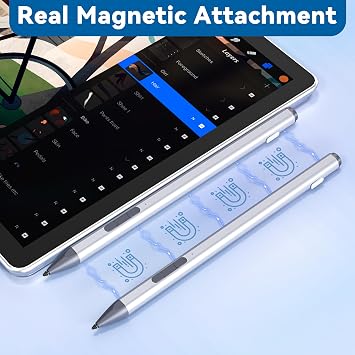
- User-Friendly Experience - The stylus for surface ust simply press any button to start writing, no Bluetooth or APP drivers required, easy to use! Equipped with two multi-functional buttons: eraser button (long-press to erase errors), right-click (one-click function, also equivalent to the right mouse button). In addition, the pen for surface is equipped with two powerful magnets that can be attached to the tablet, portable and not easy to lose.
- 4096 Pressure Sensitivity - Surface pro pencil with 4096-level pressure sensing technology, the surface stylus recognizes the pressure and tilt angle applied by the stylus and draws lines of varying thickness (the more pressure, the thicker the line). The nib is resistant and simulates the feel of real pen strokes, can precise outlining, shading, and coloring on the screen. In addition, Surface go pencil built-in smart chip ensures that the pen tip senses sensitively and smoothly with no delay or lag!
- Anti Palm Touch Technology - Stylus for Surface Pro have anti palm touch technology. When drawing or handwriting, your hand can be naturally supported on the tablet screen without worrying about unintentional touching of the screen by your hand, resulting in interruption of text or drawing input. It's as easy and natural as drawing and writing on paper! Very free flowing.
- USB C Fast Charge & Longer Standby - This window surface pro pen features USB-C fast charging technology, which allows for up to 60 hours of continuous use with just a 30-minute charge. Surface book stylus 10 Minutes of inactivity is followed by automatic hibernation, which greatly saves on battery consumption and prolongs usage time. In addition, when the indicator light is red, it means the battery is low/charging. When the light is blue, the battery is fully charged/in use, so you can keep track of the battery status.
| Battery Average Life Standby | 60 Hours |
| Compatible Devices | ASUS/HP/Sony/Dell series, Surface GO/Surface GO 2/Surface GO 3/Surface GO 4, Surface Laptop 1/Laptop 2/Laptop 3/Laptop 4/Laptop 5, Surface Pro 11/Pro 10/Pro 9/ Pro 8/ Pro X/ Pro 7/Pro 6/ Pro 5/Pro 4/Pro 3/, Surface Studio/Surface Studio 2/Surface Duo/Surface Duo2/Surface Book / Book 2 / Book 3 |
| Charging Time | 30 minutes |
| Battery Description | Rechargeable |
| Pressure Sensitivity | 4096 Levels |
| Minimum Required Operating System Version | Windows 10 |
| Compatible Tablet Computer Models | HP 7 Plus, HP Pro 8, Microsoft Surface Go, Microsoft Surface Go 2, Microsoft Surface Go 3, Microsoft Surface Go 4, Microsoft Surface Pro 11, Microsoft Surface Pro 3, Microsoft Surface Pro 4, Microsoft Surface Pro 5, Microsoft Surface Pro 6, Microsoft Surface Pro 7, Microsoft Surface Pro 8, Microsoft Surface Pro 9 |
| Item Weight | 0.04 Kilograms |
| Color | Slivery |
| Enclosure Material | Aluminum |
| Brand | Arsandyn |
| Model Number | SP04-SR-US-CD |
| Are Batteries Included | No |
| Are Batteries Required | No |
| UPC | 671891483199 |
| Unit Count | 1.0 Count |
| Manufacturer | Arsandyn |
| Mfr Part Number | SP04-SR-EU-CD |
| Material | Aluminum |
| Compatible Devices | ASUS/HP/Sony/Dell series, Surface GO/Surface GO 2/Surface GO 3/Surface GO 4, Surface Laptop 1/Laptop 2/Laptop 3/Laptop 4/Laptop 5, Surface Pro 11/Pro 10/Pro 9/ Pro 8/ Pro X/ Pro 7/Pro 6/ Pro 5/Pro 4/Pro 3/, Surface Studio/Surface Studio 2/Surface Duo/Surface Duo2/Surface Book / Book 2 / Book 3 See more |
| Batteries Required? | No |
À qui est-ce destiné ?

-
Artists & Designers
Ideal for creative professionals who need precision and versatility for drawing and design work on their Surface devices.
-
Students & Note-Takers
Perfect for students who prefer handwriting their notes and diagrams digitally, enhancing learning and organization.
-
Office Professionals
Great for business users who require efficient annotation of documents and digital whiteboarding capabilities.

-
Casual Users
Not suitable for casual users who primarily use their devices for basic tasks without needing advanced stylus features.
DESCRIPTION DU PRODUIT
Vous avez une question ? Chattez avec nous
Questions et réponses des clients
-
question:
What devices are compatible with the Surface Pen - Surface Pro Pen Stylus?
répondre: The Surface Pen - Surface Pro Pen Stylus is primarily designed to work with the Surface Pro line, including Surface Pro 11 and earlier versions. It integrates seamlessly with Surface Pro devices to enhance your creative and productivity experience. This compatibility allows you to draw, write, or annotate documents directly on the screen. Whether you're a student taking notes or an artist sketching, this pen transforms your Surface into a true digital canvas. -
question:
How does the USB-C fast charging feature work?
répondre: The Surface Pen features a USB-C fast charging capability, allowing you to quickly recharge it using any compatible USB-C charger or cable. By simply connecting the pen to a power source, you can be ready to use it again in no time. This feature is particularly useful for busy professionals and students who need a reliable tool that won't run out of battery during critical moments, ensuring that your workflow remains uninterrupted. -
question:
Can the Surface Pen be used for gaming on Surface devices?
répondre: While the Surface Pen is primarily designed for drawing, writing, and note-taking, it can also enhance gaming experiences on compatible Surface devices. Its precise control and pressure sensitivity can add new dimensions to gameplay, especially for creative games that utilize drawing or sketching mechanics. Gamers can enjoy intuitive interactions and engage in creative aspects of games that require detailed input, making it a versatile tool for various applications. -
question:
What features make the Surface Pen feel like writing on paper?
répondre: The Surface Pen incorporates advanced pressure sensitivity and tilt functionality, which mimic the feeling of writing on paper. With up to 4096 levels of pressure sensitivity, you can achieve natural variances in line thickness, letting you create detailed sketches or expressively write. This realistic experience is enhanced by the pen's precision tip and a smooth glide across the screen, making it ideal for artists and note-takers who appreciate a tactile experience. -
question:
Is there a difference between the Surface Pen and other styluses?
répondre: The Surface Pen stands out from other styluses due to its unique integration with Surface Pro devices, featuring advanced technology for superior responsiveness and accuracy. Unlike generic styluses, the Surface Pen supports pressure sensitivity, tilt, and wear-resistant tips for a more natural feel. This specialized design is ideal for both artists and professionals, providing the tools needed for precise work, whether that's drawing intricate designs or taking detailed notes. -
question:
How do I connect the Surface Pen to my Surface device?
répondre: To connect the Surface Pen, simply turn it on by pressing the top button. It will automatically pair with your compatible Surface device via Bluetooth. Once connected, you can customize the pen's shortcuts for easy access to your favorite tools or features in apps. This straightforward connection process enhances your user experience, allowing you to focus on your work or creative projects without unnecessary distractions. -
question:
Can I use the Surface Pen for document annotations?
répondre: Absolutely! The Surface Pen is perfect for annotating documents on your Surface device. With its high precision and responsiveness, you can easily highlight, underline, or make notes directly on your digital documents. This is particularly beneficial for students and professionals reviewing PDFs, contracts, or other important files, allowing for seamless collaboration and feedback without the need for printed copies. -
question:
Does the Surface Pen support palm rejection?
répondre: Yes, the Surface Pen supports advanced palm rejection technology, allowing you to rest your hand comfortably on the screen while writing or drawing. This feature prevents accidental inputs from your palm, ensuring a smooth and uninterrupted experience. Users can focus on their tasks without worrying about unintentional marks or errors, making it ideal for long drawing sessions or extensive note-taking. -
question:
Where can I buy the Surface Pen - Surface Pro Pen Stylus?
répondre: You can buy the Surface Pen - Surface Pro Pen Stylus from Ubuy. Ubuy offers a wide range of electronic products, including this state-of-the-art stylus, ensuring you have access to high-quality tools that meet your needs. Whether you're looking to enhance productivity or unleash your creativity, Ubuy is a convenient platform that provides customer support and a reliable shopping experience. -
question:
What can I do with the customizable shortcut button on the Surface Pen?
répondre: The customizable shortcut button on the Surface Pen allows you to set up quick access to your most-used applications or functions, such as opening OneNote, taking screenshots, or activating the eraser. This feature enhances your productivity by enabling you to execute actions faster without navigating through menus. Whether you're quickly jotting down an idea or editing a document, personalization makes using the pen more efficient and tailored to your workflow.
Arsandyn Stylus Pens SP04-SR-US-CD Editorial Review


**** This product receives a mixed reception from users, highlighting both its strengths and significant drawbacks. Many customers appreciate the responsiveness and user-friendly features of the stylus, especially its compatibility with Apple iPads and its impressive battery life that eliminates the need for small, traditional batteries. Several users noted that once properly set up, the stylus replicates the functionality of more expensive models, making it a popular choice for artists who spend extensive time creating digital art. However, a Considerable number of users reported severe reliability issues. Problems such as the stylus stopping charging suddenly, sticky buttons that hinder usage, and the nib's tendency to slide out of its holder were frequently mentioned. These flaws contributed to frustration and disappointment, leading to multiple purchases by some users in search of a working device. The inConsistency in product quality has deterred several users from recommending this brand altogether. In conclusion, while the stylus boasts great features and functionality for the price, the ongoing issues regarding durability and quality control cast a shadow over its overall value proposition. Customers are left divided, with loyal fans praising its performance alongside disappointed users who encountered mechanical failures. **
Avis et évaluations clients
314 évaluations des clients
-
5 étoile
61%
-
4 étoile
10%
-
3 étoile
11%
-
2 étoile
2%
-
1 étoile
16%
Donnez votre avis sur ce produit
Partagez votre avis avec d'autres clients
Avantages
- Great responsiveness and functionality
- Easy to use directly on the tablet
- Fast charging and good battery life
- Magnet feature for easier storage
- Replacement tips included
Les inconvénients
- InConsistent product quality across multiple units
Platform Trust & Buyer Confidence

MA
Mohammad
Verified buyer
“Excellent quality and original too,when ubuy send original things I will appreciate that ,I very satisfied thank you”
23 July 2026 · via Trustpilot
CK
Chitra
Verified buyer
“The order and delivery progress was communicated very well. Package arrived within the estimated time. Products arrived as expected in good condition.”
22-Jul-26 · via Trustpilot
K
kund
Verified buyer
“Good supply of products. Safe payment methods, and shipment worldwide! Genuine products.”
23-Jul-26 · via Trustpilot
OO
Onesi
Verified buyer
“Was my first time buying a product from Ubuy, but I found it so helpful. This is reliable. Gonna place a new order!”
22 July 2026 · via Trustpilot
SJ
SAO JOHN
Verified buyer
“Ubuy is a great online platform to buy stuff. Reliable, fast delivery time and great value for money. I've been using Ubuy online shopping platform for three years now and will continue to do so.”
23 July 2026 · via Trustpilot
Paiement sécurisé
Global Delivery
Easy Returns
Genuine Products
Historique des prix du produit
Informations importantes
- Limitations : Pour les produits expédiés à l'international, veuillez noter que toute garantie du fabricant peut ne pas être valide ; les options de service du fabricant peuvent ne pas être disponibles ; les manuels, instructions et avertissements de sécurité des produits peuvent ne pas être dans les langues du pays de destination ; les produits (et les matériaux qui les accompagnent) peuvent ne pas être conçus conformément aux normes, spécifications et exigences d'étiquetage du pays de destination ; et les produits peuvent ne pas être conformes à la tension et aux autres normes électriques du pays de destination (nécessitant l'utilisation d'un adaptateur ou d'un convertisseur le cas échéant). Il incombe au destinataire de s'assurer que le produit peut être importé légalement dans le pays de destination. En cas de commande auprès d'Ubuy ou de ses filiales, le destinataire est l'importateur officiel et doit se conformer à toutes les lois et réglementations du pays de destination.
- Tous les produits listés sur Ubuy ne sont pas à vendre, Ubuy étant un moteur de recherche mondial. Les produits sont soumis aux réglementations en matière d'exportation et de commerce.
CAD 57
Commandez maintenant et recevez votre commande aux alentours du Sunday, Août 16
This item is not restrict in my country.(Please click on above link if this item is not restrict in your country, So our team will review and allow.)
QTY:
Transaction sécurisée
PCI DSS compliant and ISO 27001:2022 certified, with encrypted payments and full buyer protection on every order.
Nos meilleurs partenaires logistiques
Livraison transfrontalière la plus rapide
Caractéristiques et avantages
- No Bluetooth or app needed, just press any button to start.
- Supports 4096 levels of pressure sensitivity for precise drawing.
- Anti-palm rejection allows natural use of both hands on the tablet.
- Fully charged in just 30 minutes for 60 hours of continuous use.
- Quick replaceable tip and versatile eraser side button for easy corrections.
- Smart chip for real-time ink flow with no lag or noise.
Ubuy Assurance
Experience worry-free shopping with 100% original products, PCI DSS-compliant payment security, ISO 27001-certified data protection, the fastest cross-border delivery, free returns *, and secure packaging on every order.