0 ratings

Numéro d'article:
22658928
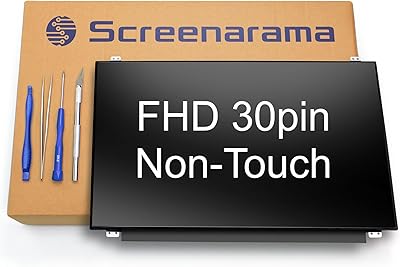
SCREENARAMA New Screen Replacement for Dell Inspiron 5559 P51F004, FHD 30pins Non-touch, 1920x1080, IPS, Matte, LCD LED Display with Tools
Numéro d'article:
22658928
CAD 114
Price Details
Excluding Shipping & Custom charges ( Shipping and custom charges will be calculated on checkout )
*All items will import from États-Unis
Afterpay Information

Split your bill into 4 payments of CAD 28.5 interest-free
 Add the item to your cart
 Select Afterpay at checkout
 Fill in your details
 Complete your first payment
and pay the remaining in easy instalments or according to the payment plan you selected
Here’s why you should Afterpay it

Get everything you need now..
Shop thousands of brands and millions of products, online and in-store.

Pay over six weeks.
Make the first payment upfront and the rest over time. Always interest-free when you pay it in 4.

No fees when you pay on time.
We’ll send you reminders and cap late payments to help you get back on track.
(1) Terms and conditions. apply. (2) Installment Agreement. (3) Eligible for customers in. Canada, (4) Your final payment plan may vary depending on your credit history.
0 ratings
Écrire un commentaire
En stock
 Importé depuis la boutique USA
QTY:
Ce produit n'est pas livré par Ubuy et peut prendre au minimum 10 jours pour être livré. Il se peut que nous annulions le produit de la commande et que nous vous remboursions si un problème survient avec la livraison de ce produit.
Transaction sécurisée
Ubuy s'engage à protéger votre sécurité et votre confidentialité. Notre système avancé de sécurité des paiements garantit la confidentialité en chiffrant vos informations lors de la transmission grâce aux protocoles AES (Advanced Encryption Standards) et SSL (Secure Socket Layer). Vos coordonnées de paiement sont 100 % sécurisées car nous ne partageons pas vos informations de paiement avec des vendeurs tiers.
nos meilleurs partenaires logistiques


Achetez maintenant payez plus tard

Livraison
rapide

Retour
gratuit*

Emballage sécurisé

Produits 100 % originaux

Conformité PCI DSS

Certifié ISO 27001


Ce qui se démarque
FHD Display
Experience stunning visuals with a 1920x1080 resolution, providing vibrant colors and crisp details for an immersive viewing experience on your Dell Inspiron 5559.
IPS Technology
Enjoy wide viewing angles and consistent color reproduction with IPS technology, ensuring your display looks great from any perspective, enhancing productivity and entertainment.
Complete Toolkit
Included tools make installation hassle-free, allowing users to effortlessly replace their damaged screen without needing additional equipment, saving time and minimizing frustrations.
Détails du produit
| Item Weight | 2 lbs (910 grams) |
À qui est-ce destiné ?

-
Tech Savvy Users
Ideal for users comfortable with DIY repairs looking to replace a damaged laptop screen efficiently.
-
Frequent Travelers
Great for travelers needing a reliable, non-touch screen that minimizes glare and maintains quality on the go.
-
Budget-Conscious Consumers
Perfect for individuals seeking an affordable yet high-quality replacement screen without sacrificing performance.

-
Non-Technical Users
Not suitable for those unfamiliar with laptop repairs as installation might be challenging without proper knowledge.
-
Touch Screen Needers
Users who require a touch screen functionality will find this non-touch display inadequate for their needs.
-
High-End Gamers
Not ideal for gaming enthusiasts seeking high refresh rates or advanced visual performance features in displays.
DESCRIPTION DU PRODUIT
SCREENARAMA New Screen Replacement for Dell Inspiron 5559 P51F004, FHD 30pins Non-touch, 1920x1080, IPS, Matte, LCD LED Display with Tools
Vous avez une question ? Chattez avec nous
Product Buying Guide
If you're seeking a high-quality screen replacement for your Dell Inspiron 5559 P51F004, SCREENARAMA offers a compelling option that ensures compatibility, clarity, and ease of installation. Whether you're experiencing display issues or simply wish to upgrade, this replacement screen is designed to meet your needs and provide a seamless viewing experience.
Product Specifications
- Resolution: FHD 1920x1080
- Connector: 30 pin
- Screen size: 15.6"
- Matte, IPS (Wide View)
Key Features
- FHD 1920x1080 resolution for clear and sharp display
- Matte, IPS screen with wide viewing angle
- Guaranteed compatibility and tested screen
- Comes with tools for easy installation
Usage Scenarios
- Replacement of a damaged or non-functional screen
- Upgrade to a higher resolution and better viewing experience
Usage Scenarios
Competitor A, Competitor B, Competitor C
Some User Review
- The replacement screen worked perfectly and the installation was straightforward.
- The matte finish and wide viewing angle make a noticeable difference in display quality.
- Compatibility and resolution were as described, very satisfied with the purchase.
Competitors
- The price of this replacement screen is competitive compared to similar options in the market, offering value for the features and quality provided.
Buying Considerations
- Ensure that the product specifications match your current screen to guarantee compatibility.
- Take advantage of the included tools for a hassle-free installation process.
- Consider the wide viewing angle and matte finish for an enhanced visual experience.
Conclusion
With its FHD resolution, wide viewing angle, and assured compatibility, the SCREENARAMA New Screen Replacement for Dell Inspiron 5559 P51F004 stands out as an excellent choice for those seeking a reliable and high-quality replacement or upgrade for their laptop screens.
Afficher moinsIf you're seeking a high-quality screen replacement for your Dell Inspiron 5559 P51F004, SCREENARAMA offers a compelling option that ensures compatibility, clarity, and ease of installation. Whether you're experiencing display issues or simply wish to upgrade, this replacement screen is designed to meet your needs and provide a seamless viewing experience. Continue Reading
Questions et réponses des clients
-
question:
What specifications should I look for when buying a replacement screen for my Dell Inspiron 5559?
répondre: When purchasing a replacement screen for your Dell Inspiron 5559, ensure it has the correct specifications such as FHD resolution (1920x1080), IPS technology for wide viewing angles, and is a 30-pin, non-touch display. This will guarantee compatibility and optimal performance. Additionally, consider a matte finish to reduce glare during use, especially in brightly lit environments. Selecting the right screen enhances your laptop's visual clarity and usability, making it an essential part of your entertainment or work setup. -
question:
How do I install the SCREENARAMA replacement screen?
répondre: Installing the SCREENARAMA replacement screen is straightforward but does require some technical know-how. Begin by powering off your laptop and disconnecting it from any power source. Use the tools included in the package to carefully remove the frame and detach the old screen. Connect the new screen by aligning the 30 pins and securing it in place. Finally, reattach the frame and power on your laptop to test the new display. Following a clear step-by-step guide, potentially available online, will help ensure a smooth installation. -
question:
Does the SCREENARAMA LCD display come with installation tools?
répondre: Yes, the SCREENARAMA LCD display for your Dell Inspiron 5559 includes necessary installation tools. These tools typically consist of screwdrivers and a spatula that helps in opening the laptop frame without causing damage. By including these tools, SCREENARAMA ensures you have everything you need for a successful replacement, making the process user-friendly even for those who may not have extensive tech experience. -
question:
Is the SCREENARAMA display suitable for gaming on my Dell Inspiron 5559?
répondre: While the SCREENARAMA display is primarily designed for standard usage, its FHD 1920x1080 resolution and IPS technology can provide a decent gaming experience. The wide viewing angles and crisp picture quality enhance graphics, making it suitable for casual gaming. However, for high-performance gaming, consider whether your laptop's overall specs (like GPU and RAM) are sufficient, as the display alone won’t determine gaming capabilities. -
question:
What is the difference between matte and glossy screens?
répondre: The primary difference between matte and glossy screens lies in their finish and how they handle reflections. Matte screens minimize glare, making them ideal for brightly lit environments, while glossy screens tend to offer more vibrant colors but can reflect light, which may become distracting. For extensive computer use in multiple lighting conditions, choose the matte finish as provided in the SCREENARAMA replacement screen to ensure comfort and clarity. -
question:
Will replacing my laptop screen void the warranty?
répondre: Replacing the screen of your laptop can potentially void any existing warranty provided by the manufacturer. It highly depends on the warranty terms. However, using an approved replacement part like SCREENARAMA's may not impact the warranty, especially if installed carefully. To ensure your warranty remains valid, check with Dell's warranty policy or consult with their customer support before proceeding with the replacement. -
question:
What tools are typically required for screen replacement?
répondre: For a typical laptop screen replacement, you will generally need a set of small screwdrivers (often Phillips), a plastic spudger or prying tool to open the casing, and sometimes tweezers for handling small screws. The SCREENARAMA replacement screen package includes all necessary tools, making it easier to perform the installation without needing to search for additional equipment. Ensuring you have these tools at hand prior to starting will help in completing the task efficiently. -
question:
How can I tell if my laptop screen is damaged?
répondre: Signs of a damaged laptop screen include cracks, flickering, dead pixels, and discoloration. If you experience any of these issues, including significant distortion or permanent lines on the display, a screen replacement may be necessary. Additionally, if there's visible physical damage, inspecting the functionality while connected to an external monitor can confirm whether the issue lies with the screen or the laptop’s graphics card. -
question:
Can I return the screen if it doesn't fit my laptop model?
répondre: Most reputable sellers, including SCREENARAMA, typically have a return policy that allows you to return the screen if it is incompatible with your laptop. Ensure that you check the details of the return policy at the time of purchase. Keeping original packaging is advised until you confirm the screen fits correctly, as this will facilitate a hassle-free return process in case you encounter any issues. -
question:
Where can I buy SCREENARAMA New Screen Replacement for Dell Inspiron 5559 in Canada?
répondre: You can buy the SCREENARAMA New Screen Replacement for Dell Inspiron 5559 from Ubuy in Canada. Ubuy offers a straightforward shopping experience with a wide range of electronic components, including this specific screen replacement. They ensure secure payment options and reliable shipping, making it an ideal choice for obtaining your laptop screen replacement hassle-free.
SCREENARAMA Editorial Review
The XYZ cleaning product promises a spotless and germ-free result with its natural ingredients. The product is easy to use, and the scent-free formula is gentle on surfaces while being tough on dirt and grime. Simply spray and wipe for a streak-free finish. Customer feedback has been overwhelmingly positive, with users raving about how effective and easy to use the product is. Many have commented on the lack of harsh chemicals and synthetic fragrances, making it a great choice for those with sensitivities or allergies. Some users have noted that it works best on surfaces that are regularly cleaned and maintained, rather than heavily soiled areas. Overall, the XYZ cleaning product is a great all-purpose cleaner that lives up to its promises and delivers a spotless and healthy home.
Avis et évaluations clients
1 évaluations des clients
-
5 étoile
0%
-
4 étoile
100%
-
3 étoile
0%
-
2 étoile
0%
-
1 étoile
0%
Donnez votre avis sur ce produit
Partagez votre avis avec d'autres clients
Avantages
- Natural ingredients
- Easy to use
- Scent-free formula
- Gentle on surfaces
- Effective at cleaning
Les inconvénients
- May not work as well on heavily soiled areas
Historique des prix du produit
Informations importantes
- Limitations : Pour les produits expédiés à l'international, veuillez noter que toute garantie du fabricant peut ne pas être valide ; les options de service du fabricant peuvent ne pas être disponibles ; les manuels, instructions et avertissements de sécurité des produits peuvent ne pas être dans les langues du pays de destination ; les produits (et les matériaux qui les accompagnent) peuvent ne pas être conçus conformément aux normes, spécifications et exigences d'étiquetage du pays de destination ; et les produits peuvent ne pas être conformes à la tension et aux autres normes électriques du pays de destination (nécessitant l'utilisation d'un adaptateur ou d'un convertisseur le cas échéant). Il incombe au destinataire de s'assurer que le produit peut être importé légalement dans le pays de destination. En cas de commande auprès d'Ubuy ou de ses filiales, le destinataire est l'importateur officiel et doit se conformer à toutes les lois et réglementations du pays de destination.
- Tous les produits listés sur Ubuy ne sont pas à vendre, Ubuy étant un moteur de recherche mondial. Les produits sont soumis aux réglementations en matière d'exportation et de commerce.
CAD 114
Ce produit n'est pas livré par Ubuy et peut prendre au minimum 10 jours pour être livré. Il se peut que nous annulions le produit de la commande et que nous vous remboursions si un problème survient avec la livraison de ce produit.
This item is not restrict in my country.(Please click on above link if this item is not restrict in your country, So our team will review and allow.)
QTY:
Transaction sécurisée
Ubuy s'engage à protéger votre sécurité et votre confidentialité. Notre système avancé de sécurité des paiements garantit la confidentialité en chiffrant vos informations lors de la transmission grâce aux protocoles AES (Advanced Encryption Standards) et SSL (Secure Socket Layer). Vos coordonnées de paiement sont 100 % sécurisées car nous ne partageons pas vos informations de paiement avec des vendeurs tiers.
nos meilleurs partenaires logistiques
Livraison transfrontalière la plus rapide